In this tutorial we will cover how to implement a real time color grading shader using DirectX 11, C++, and HLSL.
Often you will see graphics engines tint the rendering output by a single color or a color gradient to achieve a specific color look.
However, there are certain cases where we want even more detailed control per pixel and per color.
This is where color grading comes in handy.
Color grading is the ability to control the rendering of a final image by limiting the output colors to a specific, smaller color palette.
Most people will already be familiar with this through the use of color correction tools in Photoshop.
Those tools operate on pre-made color tables to perform color correction.
These tables are often called LUTs.
In this tutorial we will detail how to perform this same type of color grading in real time using 2D post processing and 3D textures in DirectX 11.
To understand the steps involved lets first start with our regular rotating cube scene:
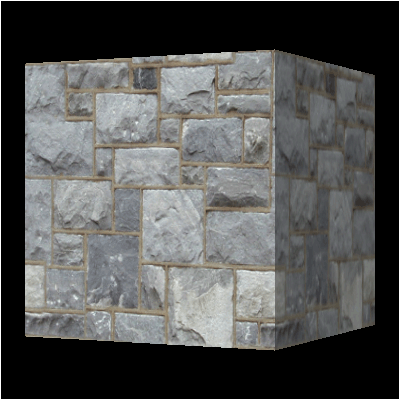
Say we want to color grade it with colors that are common on the planet Mars, such as the following picture:
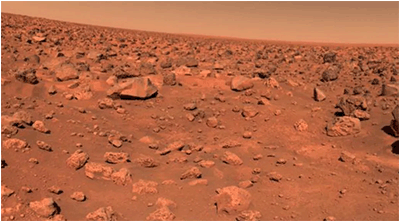
We will need to use a shader that limits the output colors to just the ones available in that picture of Mars.
So, when we have a color from the original image we will need to find the nearest match from the Mars picture, and output that Mars color instead of the original.
This will then give us a color graded output such as follows:
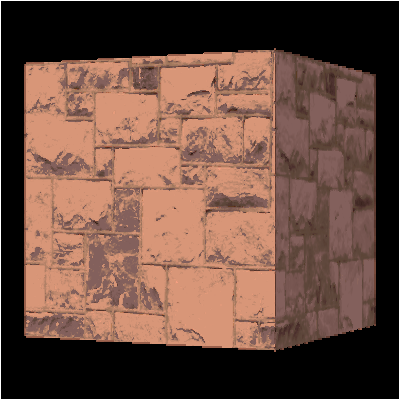
To perform this type of color grading we must first start by creating a list of all the unique colors in the Mars picture.
This is easily done by reading in the image as an array, and then making a smaller subset array with all the unique RGB colors we find in the image.
This will be our unique color list.
Note also that instead of using an image you could just make a TGA file and plot all the exact color pixels you want into it.
Or even combine both methods and use and image and then plot some extra color pixels into the corner.
Now that we have an array of unique RGB colors we will move onto the second step which will be to convert the unique color list array into a color lookup table.
This color lookup table needs to be indexable and shader useable.
To meet those two requirements, we will need to create a 3D texture.
This 3D texture will give us the ability to quickly index into it and treat it as a lookup table.
We will use the RGB source colors of the render texture that we are trying to color grade as the indexes into the 3D texture.
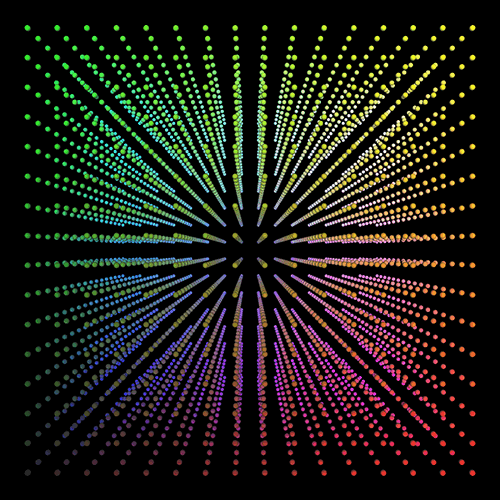
To create the 3D texture that we can index into we will start by first creating a 3D cube that uses RGB colors as its indexes.
So red will be the X axis (width) going from left at 0 to the right at 255.
The green color will be the Y axis (height) going from bottom at 0 to the top at 255.
The blue color will be the Z axis (depth) going from near at 0 to far at 255.
To visualize this 8-bit color RGB cube it will look like the following:
Note that since we are color grading, which generally means subtracting colors, we can go with a reduced precision cube.
For example, a 16x16x16 or 32x32x32 cube will give very good results instead of a 256x256x256 cube.
Any colors missing will just be interpolated between in our shader.
This will reduce the memory required for a 48MB 3D texture down to 12KB for nearly the same color graded image quality.
Of course, we should still make our cube size a variable that we can modify easily to test the different qualities.
Now that we have our regular RGB cube we can move onto the third step.
In this step we will go through all the RGB colors in the 3D cube and find the closest color to the RGB color from the unique color list that contains our Mars colors.
So, for each regular RGB color we scan through the entire unique color list array and subtract the colors from each other.
The lowest resulting color value will be the closest color.
We then use that closest unique color to replace the original RGB color in the cube.
Once we are done going through the entire cube, we should now have a new cube that looks like the following:
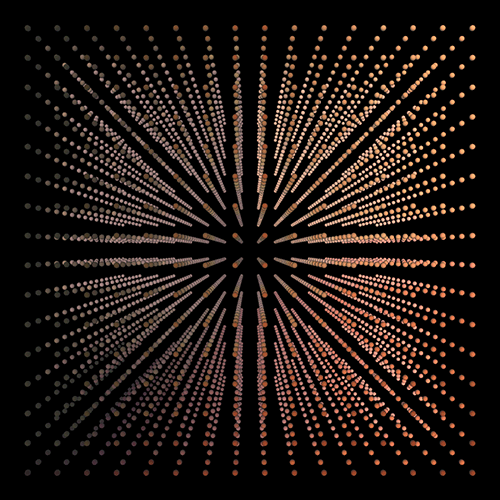
This cube will now be used as the color lookup table to replace RGB colors from the original rendered scene to create our color graded output scene.
With the completed cube we can move onto the fourth step and write it out as an unsigned char buffer in RGB pairs.
The order is important, so we write it first along the red X axis, then green Y axis, then blue Z axis from bottom to top order.
This way it can be read in directly as a DirectX 3D texture without having to do any modifications to the order.
The fifth step is to create a 3D texture in our engine from the file containing the buffer with our unique color cube.
We use the CreateTexture3D function to create a texture the same as any other texture.
The only difference is we now have a depth value and call most of the same functions with 3D data instead of 2D data.
The sixth and final step is to render our regular scene out to a texture and perform 2D post processing on it with our color grading shader.
The color grading shader will take the render texture as one shader texture input, and the 3D color lookup table as the other shader texture input.
Then we can use the RGB color of the source render texture as the index into the 3D texture to get our replacement color and do our color grading.
This will be done with a single line of HLSL code:
replacementColor = clutTexture.Sample(SampleType, textureColor.rgb);
This indexing method is extremely fast, and we will now have very precise color grading.
Finally, do note that instead of replacing the color there are other operations you could perform.
For example, you could do a linear interpolation to blend the image and the unique color together.
You could also use multiple color look up tables as multiple 3D texture inputs into the shader.
However, in this tutorial we will just cover the basic replacement technique.
Framework
The framework will have two new classes. The ClutClass will contain the 3D texture that gets built from the unique color data.
And the ColorGradeShaderClass will encapsulate the color grading shader.

For this tutorial I have separated out the code for producing a unique color list from a targa image.
It will just be a main.cpp single source file that you can compile and run, and it does the processing work and outputs a file.
You should generally pre-process your color lookup tables since it can take more than a couple seconds to do so at run time.
Also, you may be processing very large images to generate your unique color lists, and storing those images is a waste of space when the resulting unique color list is only a couple of kilobytes in size.
main.cpp
The following is a small stand-alone program that will process an image and output a unique color list array that can be read in as a 3D texture in OpenGL.
////////////////////////////////////////////////////////////////////////////////
// Filename: main.cpp
////////////////////////////////////////////////////////////////////////////////


//////////////
// INCLUDES //
//////////////
#include <stdio.h>
#include <string.h>
#include <iostream>
using namespace std;


/////////////
// STRUCTS //
/////////////
struct TargaHeader
{
    unsigned char data1[12];
    unsigned short width;
    unsigned short height;
    unsigned char bpp;
    unsigned char data2;
};

struct ColorArrayType
{
    int red, green, blue;
};


///////////////
// FUNCTIONS //
///////////////
bool GetTargaDimensions(char*, int&, int&);
bool ReadTargaData(char*, unsigned char*, unsigned long);
void FindUniqueColors(unsigned char*, unsigned char*, int, int, int&);
void FindMatch(int, int, int, ColorArrayType*, int, int&, int&, int&);
bool WriteClutData(unsigned char*, int);


//////////////////
// MAIN PROGRAM //
//////////////////
int main()
{
    char filename[256];
    unsigned char *targaData, *colorList;
    unsigned long imageSize;
    int cubeSize, height, width, arraySize;
    bool result;
    unsigned char *outputArray;
    ColorArrayType* colorArray;
    int i, j, k, index, cubeRed, cubeGreen, cubeBlue, outRed, outGreen, outBlue;
The first part of the program will set the config for the file we are reading as well as the size of the cube.
After that it will read in the dimensions of the targa image from the targa file.
    // Set the size of the cube and the image file name.
    cubeSize = 16;
    strcpy(filename, "../Engine/data/colors003.tga");

    // Get the dimensions of the TGA image.
    result = GetTargaDimensions(filename, width, height);
    if(!result)
    {
        return -1;
    }
Once we have our dimensions, we will create a buffer and read the targa file into it.
     // Calculate the size of the 24 bit image data.
    imageSize = width * height * 3;

    // Allocate memory for the targa image data.
    targaData = new unsigned char[imageSize];

    // Read in the TGA file into the targaData array.
    result = ReadTargaData(filename, targaData, imageSize);
    if(!result)
    {
        return -1;
    }
Next, we will create a color list and call the FindUniqueColors function to scan the targa image and store all of the unique colors from it into the color list.
    // Create the list to store the unique colors in.
    colorList = new unsigned char[imageSize];

    // Find all the unique colors in the targa data and store them in the color list.  Get populated color list and array size back.
    FindUniqueColors(targaData, colorList, width, height, arraySize);

    // Release the targa image data now that it was copied into the color list.
    delete [] targaData;
    targaData = 0;
The next step will be to create another array where we can copy the unsigned char unique colors into an integer format array so that we can do quicker math with the colors.
    // Create another array and copy all the unique colors from the color list into it and convert them to integers.
    colorArray = new ColorArrayType[arraySize];

    for(i=0; i<arraySize; i++)
    {
        colorArray[i].red   = (int)colorList[(i*3)];
        colorArray[i].green = (int)colorList[(i*3) + 1];
        colorArray[i].blue  = (int)colorList[(i*3) + 2];
    }

    // Release the color list now that we have the unique colors in integer format.
    delete [] colorList;
    colorList = 0;
Here is where we create our 3D cube. We create an output array that will store the 3D cube.
Then we loop through all possible RGB colors (based on the size of the cube) and find their closest match from the unique color list.
    cout << "Creating cube." << endl;

    // Create the output array for the 3D texture that we will store the final color lookup table data.
    outputArray = new unsigned char[cubeSize * cubeSize * cubeSize * 3];

    // Create the 3D texture cube by going through all RGB colors based on the cube size, and find the closest color from the CLUT data.
    index = 0;
    for(k=0; k<cubeSize; k++)
    {
        for(j=0; j<cubeSize; j++)
        {
            for(i=0; i<cubeSize; i++)
            {
                cubeRed =   (int)(((float)i / (float)(cubeSize-1)) * 255.0f);
                cubeGreen = (int)(((float)j / (float)(cubeSize-1)) * 255.0f);
                cubeBlue =  (int)(((float)k / (float)(cubeSize-1)) * 255.0f);

                FindMatch(cubeRed, cubeGreen, cubeBlue, colorArray, arraySize, outRed, outGreen, outBlue);

                outputArray[index]   = (unsigned char)outRed;
                outputArray[index+1] = (unsigned char)outGreen;
                outputArray[index+2] = (unsigned char)outBlue;

                index += 3;
            }
        }
    }

    // Released the unique color array now that the cube is built.
    delete [] colorArray;
    colorArray = 0;
Now that we have our 3D cube of unique colors in the output array, we then write it to a file.
We also write the cube size to the beginning of the file as well.
    // Write out the CLUT data file.
    result = WriteClutData(outputArray, cubeSize);
    if(!result)
    {
        cout << "Error: Could not write CLUT data file." << endl;
        return -1;
    }

    // Release the output array.
    delete [] outputArray;
    outputArray = 0;

    return 0;
}


bool GetTargaDimensions(char* filename, int& width, int& height)
{
    FILE* filePtr;
    TargaHeader targaFileHeader;
    unsigned long long count;
    int bpp, error;


    // Open the targa file for reading in binary.
    error = fopen_s(&filePtr, filename, "rb");
    if(error != 0)
    {
        cout << "Error: Could not open the file: " << filename << endl;
        return false;
    }

    // Read in the file header.
    count = fread(&targaFileHeader, sizeof(TargaHeader), 1, filePtr);
    if(count != 1)
    {
        cout << "Error: Could not read the targa header." << endl;
        return false;
    }

    // Get the important information from the header.
    width = (int)targaFileHeader.width;
    height = (int)targaFileHeader.height;
    bpp = (int)targaFileHeader.bpp;

    // Check that it is 24 bit.
    if(bpp != 24)
    {
        cout << "Error: Not a 24 bit TGA file." << endl;
        return false;
    }

    // Close the file.
    error = fclose(filePtr);
    if(error != 0)
    {
        cout << "Error: Could not close the input file." << endl;
        return false;
    }

    return true;
}


bool ReadTargaData(char* filename, unsigned char* targaData, unsigned long imageSize)
{
    FILE* filePtr;
    TargaHeader targaFileHeader;
    unsigned long long count;
    int error;


    cout << "Reading TGA file." << endl;

    // Open the targa file for reading in binary.
    error = fopen_s(&filePtr, filename, "rb");
    if(error != 0)
    {
        cout << "Error: Could not open the file: " << filename << endl;
        return false;
    }

    // Read in the file header.
    count = fread(&targaFileHeader, sizeof(TargaHeader), 1, filePtr);
    if(count != 1)
    {
        cout << "Error: Could not read the targa header." << endl;
        return false;
    }

    // Read in the targa image data.
    count = fread(targaData, 1, imageSize, filePtr);
    if(count != imageSize)
    {
        cout << "Error: Could not read in the targa image data from the file." << endl;
        return false;
    }

    // Close the file.
    error = fclose(filePtr);
    if(error != 0)
    {
        cout << "Error: Could not close the input file." << endl;
        return false;
    }

    return true;
}


void FindUniqueColors(unsigned char* targaData, unsigned char* colorList, int width, int height, int& arraySize)
{
    int index, i, j, k, listCounter, duplicates;
    unsigned char red, green, blue;
    bool found;


    cout << "Finding all unique colors in the targa data array." << endl;

    // Initialize counts.
    listCounter = 0;
    duplicates = 0;

    // Find all the unique colors and copy them into the color list.
    index=0;
    for(j=0; j<height; j++)
    {
        for(i=0; i<width; i++)
        {
            red   = targaData[index + 2];
            green = targaData[index + 1];
            blue  = targaData[index + 0];
            index += 3;

            // Go through the list of unique colors and see if this exists.
            found = false;
            for(k=0; k<listCounter; k++)
            {
                if(colorList[k*3] == red)
                {
                    if(colorList[(k*3) + 1] == green)
                    {
                        if(colorList[(k*3) + 2] == blue)
                        {
                            found = true;
                            duplicates++;
                            break;
                        }
                    }
                }
            }

            if(!found)
            {
                colorList[listCounter*3] = red;
                colorList[(listCounter*3)+1] = green;
                colorList[(listCounter*3)+2] = blue;
                listCounter++;
            }
        }
    }

    // Set the size of the unique colors array.
    arraySize = listCounter;

    return;
}


void FindMatch(int cubeRed, int cubeGreen, int cubeBlue, ColorArrayType* colorArray, int arraySize, int& outRed, int& outGreen, int& outBlue)
{
    int i, redResult, greenResult, blueResult, sumResult, previousResult;


    // Initialize the previous result color.
    previousResult = 255 + 255 + 255;

    // Loop through the unique color array and find the closest matching color to the cube color.
    for(i=0; i<arraySize; i++)
    {
        redResult = colorArray[i].red - cubeRed;
        if(redResult < 0)
        {
            redResult *= -1;
        }

        greenResult = colorArray[i].green - cubeGreen;
        if(greenResult < 0)
        {
            greenResult *= -1;
        }

        blueResult = colorArray[i].blue - cubeBlue;
        if(blueResult < 0)
        {
            blueResult *= -1;
        }

        // Add the results up.
        sumResult = redResult + greenResult + blueResult;

        // If this unique color is closer than the other unique colors to the cube color then set it as the output color.
        if(sumResult < previousResult)
        {
            previousResult = sumResult;

            outRed   = colorArray[i].red;
            outGreen = colorArray[i].green;
            outBlue  = colorArray[i].blue;
        }
    }

    return;
}


bool WriteClutData(unsigned char* outputArray, int cubeSize)
{
    FILE* outputFilePtr;
    char filename[256];
    unsigned long long count, bufferSize;
    int error;


    // Set the output filename.
    strcpy(filename, "clut.dat");

    // Open the output file for writing in binary.
    error = fopen_s(&outputFilePtr, filename, "wb");
    if(error != 0)
    {
        return false;
    }

    // Write out the size of the cube.
    count = fwrite(&cubeSize, sizeof(int), 1, outputFilePtr);
    if(count != 1)
    {
        return false;
    }

    // Set the size of the data we are writing out.
    bufferSize = cubeSize * cubeSize * cubeSize * 3;

    // Write out the data to the output file.
    count = fwrite(outputArray, sizeof(unsigned char), bufferSize, outputFilePtr);
    if(count != bufferSize)
    {
        return false;
    }

    // Close the output file.
    error = fclose(outputFilePtr);
    if(error != 0)
    {
        return false;
    }

    return true;
}
Clutclass.h
The CLUTClass is where we encapsulate our 3D texture.
This is mostly the TextureClass re-written to handle 3D textures instead of 2D textures.
We will load the color lookup table from the file and then load it into a 3D DirectX texture.
This class will then provide the shader access to the 3D texture for color grading purposes.
////////////////////////////////////////////////////////////////////////////////
// Filename: clutclass.h
////////////////////////////////////////////////////////////////////////////////
#ifndef _CLUTCLASS_H_
#define _CLUTCLASS_H_


//////////////
// INCLUDES //
//////////////
#include <d3d11.h>
#include <stdio.h>


////////////////////////////////////////////////////////////////////////////////
// Class name: ClutClass
////////////////////////////////////////////////////////////////////////////////
class ClutClass
{
public:
    ClutClass();
    ClutClass(const ClutClass&);
    ~ClutClass();

    bool Initialize(ID3D11Device*, ID3D11DeviceContext*);
    void Shutdown();

    ID3D11ShaderResourceView* GetTexture();

private:
    bool LoadCLUTData(char*);
    void ReleaseCLUTData();

    bool BuildTexture(ID3D11Device*, ID3D11DeviceContext*);

private:
    ID3D11Texture3D* m_texture;
    ID3D11ShaderResourceView* m_textureView;
    unsigned char* m_targaData;
    int m_textureWidth, m_textureHeight, m_textureDepth;
};

#endif
Clutclass.cpp
////////////////////////////////////////////////////////////////////////////////
// Filename: clutclass.cpp
////////////////////////////////////////////////////////////////////////////////
#include "clutclass.h"


ClutClass::ClutClass()
{
    m_targaData = 0;
    m_texture = 0;
    m_textureView = 0;
}


ClutClass::ClutClass(const ClutClass& other)
{
}


ClutClass::~ClutClass()
{
}
Similar to TextureClass, we will load the data from the CLUT file, create the 3D texture, and then release the CLUT file data buffers.
bool ClutClass::Initialize(ID3D11Device* device, ID3D11DeviceContext* deviceContext)
{
    char filename[256];
    bool result;


    // Set the filename of the CLUT data file.
    strcpy_s(filename, "../Engine/data/clut.dat");

    // Load the CLUT data from the file.
    result = LoadCLUTData(filename);
    if(!result)
    {
        return false;
    }

    // Create the texture from the targa data.
    result = BuildTexture(device, deviceContext);
    if(!result)
    {
        return false;
    }

    // Release the CLUT data now that the 3D texture has been created from it.
    ReleaseCLUTData();

    return true;
}
The Shutdown function will release our 3D texture resources.
void ClutClass::Shutdown()
{
    // Release the texture view resource.
    if(m_textureView)
    {
        m_textureView->Release();
        m_textureView = 0;
    }

    // Release the texture.
    if(m_texture)
    {
        m_texture->Release();
        m_texture = 0;
    }

    // Release the CLUT data.
    if(m_targaData)
    {
        delete [] m_targaData;
        m_targaData = 0;
    }
    return;
}
The LoadCLUTData function will load the CLUT data from file into a buffer that can be used to make a 3D texture with.
bool ClutClass::LoadCLUTData(char* filename)
{
    FILE* filePtr;
    unsigned char* buffer;
    unsigned long long count, bufferSize, imageSize;
    int error, cubeSize, i, j, k, index, index2;
Similar to other textures we will open the file and read its header.
In this case the header is just an integer specifying the size of the cube.
    // Open the targa file for reading in binary.
    error = fopen_s(&filePtr, filename, "rb");
    if(error != 0)
    {
        return false;
    }

    // Read in the cube size.
    count = fread(&cubeSize, sizeof(int), 1, filePtr);
    if(count != 1)
    {
        return false;
    }
Now that we know the size of the cube, we can create a buffer to read the data into.
    // Set the size of the buffer using the cube size.
    bufferSize = cubeSize * cubeSize * cubeSize * 3;

    // Create the buffer.
    buffer = new unsigned char[bufferSize];

    // Read the CLUT data into the buffer.
    count = fread(buffer, sizeof(unsigned char), bufferSize, filePtr);
    if(count != bufferSize)
    {
        return false;
    }

    // Close the file.
    error = fclose(filePtr);
    if(error != 0)
    {
        return false;
    }
Once the data is read in, we can setup the dimensions for our 3D texture.
    // Set the 3D texture size.
    m_textureHeight = cubeSize;
    m_textureWidth = cubeSize;
    m_textureDepth = cubeSize;
And since we use mostly 32-bit textures in this tutorial series, we will convert the CLUT data from 24-bit into 32-bit and just set the alpha to 1.
We will store the resulting 32-bit 3D clut data in the m_targaData buffer to be used to create the 3D DirectX texture with.
     // Calculate the size of the 32 bit image data.
    imageSize = cubeSize * cubeSize * cubeSize * 4;

    // Allocate memory for the targa destination data.
    m_targaData = new unsigned char[imageSize];

    // Copy the 24bit data into the 32 bit buffer.
    index  = 0;
    index2 = 0;

    for(k=0; k<cubeSize; k++)
    {
        for(j=0; j<cubeSize; j++)
        {
            for(i=0; i<cubeSize; i++)
            {
                m_targaData[index + 0] = buffer[index2 + 0];  // Red.
                m_targaData[index + 1] = buffer[index2 + 1];  // Green.
                m_targaData[index + 2] = buffer[index2 + 2];  // Blue
                m_targaData[index + 3] = (unsigned char)255;  // Alpha

                index  += 4;
                index2 += 3;
            }
        }
    }

    // Release the old buffer.
    delete [] buffer;
    buffer = 0;

    return true;
}


void ClutClass::ReleaseCLUTData()
{
    if(m_targaData)
    {
        delete [] m_targaData;
        m_targaData = 0;
    }

    return;
}
The BuildTexture function works the same as it does in TextureClass, but we are using 3D texturing calls and data types instead.
bool ClutClass::BuildTexture(ID3D11Device* device, ID3D11DeviceContext* deviceContext)
{
    D3D11_TEXTURE3D_DESC textureDesc;
    D3D11_SHADER_RESOURCE_VIEW_DESC srvDesc;
    HRESULT hResult;
    unsigned int rowPitch, depthPitch;
The textureDesc is now a D3D11_TEXTURE3D_DESC data type.
Most importantly we now define depth.
It has less parameters than a normal 2D texture description, but most of them remain the same.
    // Setup the description of the texture.
    textureDesc.Height = m_textureHeight;
    textureDesc.Width = m_textureWidth;
    textureDesc.Depth = m_textureDepth;
    textureDesc.MipLevels = 0;
    textureDesc.Format = DXGI_FORMAT_R8G8B8A8_UNORM;
    textureDesc.Usage = D3D11_USAGE_DEFAULT;
    textureDesc.BindFlags = D3D11_BIND_SHADER_RESOURCE | D3D11_BIND_RENDER_TARGET;
    textureDesc.CPUAccessFlags = 0;
    textureDesc.MiscFlags = D3D11_RESOURCE_MISC_GENERATE_MIPS;
We now call CreateTexture3D instead of CreateTexture2D.
    // Create the empty texture.
    hResult = device->CreateTexture3D(&textureDesc, NULL, &m_texture);
    if(FAILED(hResult))
    {
        return false;
    }
With 3D textures we need row pitch and depth pitch.
The depth pitch will just be the height of the 3D texture multiplied by the already calculated row pitch.
There are some good diagrams on the MSDN website showing the layout for 3D textures and how the pitch works in case you are interested.
    // Set the row pitch of the targa image data.
    rowPitch = (m_textureWidth * 4) * sizeof(unsigned char);
    depthPitch = rowPitch * m_textureHeight;  // Source Depth Pitch = [Source Row Pitch] * [number of rows (height)]
The UpdateSubresource function requires the new depth pitch as the last input parameter to copy the data correctly into the texture resource.
    // Copy the targa image data into the texture.
    deviceContext->UpdateSubresource(m_texture, 0, NULL, m_targaData, rowPitch, depthPitch);
The ViewDimension needs to be set to D3D11_SRV_DIMENSION_TEXTURE3D.
    // Setup the shader resource view description.
    srvDesc.Format = textureDesc.Format;
    srvDesc.ViewDimension = D3D11_SRV_DIMENSION_TEXTURE3D;
    srvDesc.Texture3D.MostDetailedMip = 0;
    srvDesc.Texture3D.MipLevels = -1;

    // Create the shader resource view for the texture.
    hResult = device->CreateShaderResourceView(m_texture, &srvDesc, &m_textureView);
    if(FAILED(hResult))
    {
        return false;
    }
3D textures require mipmaps as well, basically lower quality 3D pyramids.
    // Generate mipmaps for this texture.
    deviceContext->GenerateMips(m_textureView);

    return true;
}


ID3D11ShaderResourceView* ClutClass::GetTexture()
{
    return m_textureView;
}
Colorgrade.vs
The color grade vertex shader will be the standard vertex shader that we use for most of the shaders in these tutorials.
////////////////////////////////////////////////////////////////////////////////
// Filename: colorgrade.vs
////////////////////////////////////////////////////////////////////////////////


/////////////
// GLOBALS //
/////////////
cbuffer MatrixBuffer
{
    matrix worldMatrix;
    matrix viewMatrix;
    matrix projectionMatrix;
};


//////////////
// TYPEDEFS //
//////////////
struct VertexInputType
{
    float4 position : POSITION;
    float2 tex : TEXCOORD0;
};

struct PixelInputType
{
    float4 position : SV_POSITION;
    float2 tex : TEXCOORD0;
};


////////////////////////////////////////////////////////////////////////////////
// Vertex Shader
////////////////////////////////////////////////////////////////////////////////
PixelInputType ColorGradeVertexShader(VertexInputType input)
{
    PixelInputType output;


    // Change the position vector to be 4 units for proper matrix calculations.
    input.position.w = 1.0f;

    // Calculate the position of the vertex against the world, view, and projection matrices.
    output.position = mul(input.position, worldMatrix);
    output.position = mul(output.position, viewMatrix);
    output.position = mul(output.position, projectionMatrix);

    // Store the texture coordinates for the pixel shader.
    output.tex = input.tex;

    return output;
}
Colorgrade.ps
////////////////////////////////////////////////////////////////////////////////
// Filename: colorgrade.ps
////////////////////////////////////////////////////////////////////////////////


/////////////
// GLOBALS //
/////////////
The color grade shader will have two texture inputs.
The shaderTexture will be our render texture output that we are trying to color grade.
The clutTexture is our 3D texture containing the color lookup table full of our unique colors that will be used to replace the original RGB colors of the source image.
Texture2D shaderTexture : register(t0);
Texture3D clutTexture : register(t1);
SamplerState SampleType : register(s0);


//////////////
// TYPEDEFS //
//////////////
struct PixelInputType
{
    float4 position : SV_POSITION;
    float2 tex : TEXCOORD0;
};


////////////////////////////////////////////////////////////////////////////////
// Pixel Shader
////////////////////////////////////////////////////////////////////////////////
float4 ColorGradePixelShader(PixelInputType input) : SV_TARGET
{
    float4 textureColor;
    float4 replacementColor;


    // Sample the pixel color from the texture using the sampler at this texture coordinate location.
    textureColor = shaderTexture.Sample(SampleType, input.tex);
Here is where we index into the 3D texture to get our replacement texture.
We use the original image RGB colors as our indexes for a fast lookup of our replacement unique color.
    // Sample the 3D texture to corect the color using the color lookup table data.
    replacementColor = clutTexture.Sample(SampleType, textureColor.rgb);

    return replacementColor;
}
Colorgradeshaderclass.h
The ColorGradeShaderClass will follow the similar class layout to the other shaders in these tutorials.
////////////////////////////////////////////////////////////////////////////////
// Filename: colorgradeshaderclass.h
////////////////////////////////////////////////////////////////////////////////
#ifndef _COLORGRADESHADERCLASS_H_
#define _COLORGRADESHADERCLASS_H_


//////////////
// INCLUDES //
//////////////
#include <d3d11.h>
#include <d3dcompiler.h>
#include <directxmath.h>
#include <fstream>
using namespace DirectX;
using namespace std;


////////////////////////////////////////////////////////////////////////////////
// Class name: ColorGradeShaderClass
////////////////////////////////////////////////////////////////////////////////
class ColorGradeShaderClass
{
private:
    struct MatrixBufferType
    {
        XMMATRIX world;
        XMMATRIX view;
        XMMATRIX projection;
    };

public:
    ColorGradeShaderClass();
    ColorGradeShaderClass(const ColorGradeShaderClass&);
    ~ColorGradeShaderClass();

    bool Initialize(ID3D11Device*, HWND);
    void Shutdown();
    bool Render(ID3D11DeviceContext*, int, XMMATRIX, XMMATRIX, XMMATRIX, ID3D11ShaderResourceView*, ID3D11ShaderResourceView*);

private:
    bool InitializeShader(ID3D11Device*, HWND, WCHAR*, WCHAR*);
    void ShutdownShader();
    void OutputShaderErrorMessage(ID3D10Blob*, HWND, WCHAR*);

    bool SetShaderParameters(ID3D11DeviceContext*, XMMATRIX, XMMATRIX, XMMATRIX, ID3D11ShaderResourceView*, ID3D11ShaderResourceView*);
    void RenderShader(ID3D11DeviceContext*, int);

private:
    ID3D11VertexShader* m_vertexShader;
    ID3D11PixelShader* m_pixelShader;
    ID3D11InputLayout* m_layout;
    ID3D11Buffer* m_matrixBuffer;
    ID3D11SamplerState* m_sampleState;
};

#endif
Colorgradeshaderclass.cpp
////////////////////////////////////////////////////////////////////////////////
// Filename: colorgradeshaderclass.cpp
////////////////////////////////////////////////////////////////////////////////
#include "colorgradeshaderclass.h"


ColorGradeShaderClass::ColorGradeShaderClass()
{
    m_vertexShader = 0;
    m_pixelShader = 0;
    m_layout = 0;
    m_matrixBuffer = 0;
    m_sampleState = 0;
}


ColorGradeShaderClass::ColorGradeShaderClass(const ColorGradeShaderClass& other)
{
}


ColorGradeShaderClass::~ColorGradeShaderClass()
{
}


bool ColorGradeShaderClass::Initialize(ID3D11Device* device, HWND hwnd)
{
    wchar_t vsFilename[128];
    wchar_t psFilename[128];
    int error;
    bool result;
Load the color grade shaders here.
    // Set the filename of the vertex shader.
    error = wcscpy_s(vsFilename, 128, L"../Engine/colorgrade.vs");
    if(error != 0)
    {
        return false;
    }

    // Set the filename of the pixel shader.
    error = wcscpy_s(psFilename, 128, L"../Engine/colorgrade.ps");
    if(error != 0)
    {
        return false;
    }

    // Initialize the vertex and pixel shaders.
    result = InitializeShader(device, hwnd, vsFilename, psFilename);
    if(!result)
    {
        return false;
    }

    return true;
}


void ColorGradeShaderClass::Shutdown()
{
    // Shutdown the vertex and pixel shaders as well as the related objects.
    ShutdownShader();

    return;
}
The Render function will be taking in the three regular matrices, the render texture to perform the processing on, as well as the 3D CLUT texture.
bool ColorGradeShaderClass::Render(ID3D11DeviceContext* deviceContext, int indexCount, XMMATRIX worldMatrix, XMMATRIX viewMatrix, XMMATRIX projectionMatrix,
                                   ID3D11ShaderResourceView* texture, ID3D11ShaderResourceView* clutTexture)
{
    bool result;


    // Set the shader parameters that it will use for rendering.
    result = SetShaderParameters(deviceContext, worldMatrix, viewMatrix, projectionMatrix, texture, clutTexture);
    if(!result)
    {
        return false;
    }

    // Now render the prepared buffers with the shader.
    RenderShader(deviceContext, indexCount);

    return true;
}


bool ColorGradeShaderClass::InitializeShader(ID3D11Device* device, HWND hwnd, WCHAR* vsFilename, WCHAR* psFilename)
{
    HRESULT result;
    ID3D10Blob* errorMessage;
    ID3D10Blob* vertexShaderBuffer;
    ID3D10Blob* pixelShaderBuffer;
    D3D11_INPUT_ELEMENT_DESC polygonLayout[2];
    unsigned int numElements;
    D3D11_BUFFER_DESC matrixBufferDesc;
    D3D11_SAMPLER_DESC samplerDesc;


    // Initialize the pointers this function will use to null.
    errorMessage = 0;
    vertexShaderBuffer = 0;
    pixelShaderBuffer = 0;
Set the vertex and pixel shader names and compile them.
    // Compile the vertex shader code.
    result = D3DCompileFromFile(vsFilename, NULL, NULL, "ColorGradeVertexShader", "vs_5_0", D3D10_SHADER_ENABLE_STRICTNESS, 0, &vertexShaderBuffer, &errorMessage);
    if(FAILED(result))
    {
        // If the shader failed to compile it should have writen something to the error message.
        if(errorMessage)
        {
            OutputShaderErrorMessage(errorMessage, hwnd, vsFilename);
        }
        // If there was nothing in the error message then it simply could not find the shader file itself.
        else
        {
            MessageBox(hwnd, vsFilename, L"Missing Shader File", MB_OK);
        }

        return false;
    }

    // Compile the pixel shader code.
    result = D3DCompileFromFile(psFilename, NULL, NULL, "ColorGradePixelShader", "ps_5_0", D3D10_SHADER_ENABLE_STRICTNESS, 0, &pixelShaderBuffer, &errorMessage);
    if(FAILED(result))
    {
        // If the shader failed to compile it should have writen something to the error message.
        if(errorMessage)
        {
            OutputShaderErrorMessage(errorMessage, hwnd, psFilename);
        }
        // If there was nothing in the error message then it simply could not find the file itself.
        else
        {
            MessageBox(hwnd, psFilename, L"Missing Shader File", MB_OK);
        }

        return false;
    }

    // Create the vertex shader from the buffer.
    result = device->CreateVertexShader(vertexShaderBuffer->GetBufferPointer(), vertexShaderBuffer->GetBufferSize(), NULL, &m_vertexShader);
    if(FAILED(result))
    {
        return false;
    }

    // Create the pixel shader from the buffer.
    result = device->CreatePixelShader(pixelShaderBuffer->GetBufferPointer(), pixelShaderBuffer->GetBufferSize(), NULL, &m_pixelShader);
    if(FAILED(result))
    {
        return false;
    }
This is a 2D post processing shader so we only need position and texture coordinates for the vertex shader.
    // Create the vertex input layout description.
    polygonLayout[0].SemanticName = "POSITION";
    polygonLayout[0].SemanticIndex = 0;
    polygonLayout[0].Format = DXGI_FORMAT_R32G32B32_FLOAT;
    polygonLayout[0].InputSlot = 0;
    polygonLayout[0].AlignedByteOffset = 0;
    polygonLayout[0].InputSlotClass = D3D11_INPUT_PER_VERTEX_DATA;
    polygonLayout[0].InstanceDataStepRate = 0;

    polygonLayout[1].SemanticName = "TEXCOORD";
    polygonLayout[1].SemanticIndex = 0;
    polygonLayout[1].Format = DXGI_FORMAT_R32G32_FLOAT;
    polygonLayout[1].InputSlot = 0;
    polygonLayout[1].AlignedByteOffset = D3D11_APPEND_ALIGNED_ELEMENT;
    polygonLayout[1].InputSlotClass = D3D11_INPUT_PER_VERTEX_DATA;
    polygonLayout[1].InstanceDataStepRate = 0;

    // Get a count of the elements in the layout.
    numElements = sizeof(polygonLayout) / sizeof(polygonLayout[0]);

    // Create the vertex input layout.
    result = device->CreateInputLayout(polygonLayout, numElements, vertexShaderBuffer->GetBufferPointer(), vertexShaderBuffer->GetBufferSize(), &m_layout);
    if(FAILED(result))
    {
        return false;
    }

    // Release the vertex shader buffer and pixel shader buffer since they are no longer needed.
    vertexShaderBuffer->Release();
    vertexShaderBuffer = 0;

    pixelShaderBuffer->Release();
    pixelShaderBuffer = 0;

    // Setup the description of the dynamic constant buffer that is in the vertex shader.
    matrixBufferDesc.Usage = D3D11_USAGE_DYNAMIC;
    matrixBufferDesc.ByteWidth = sizeof(MatrixBufferType);
    matrixBufferDesc.BindFlags = D3D11_BIND_CONSTANT_BUFFER;
    matrixBufferDesc.CPUAccessFlags = D3D11_CPU_ACCESS_WRITE;
    matrixBufferDesc.MiscFlags = 0;
    matrixBufferDesc.StructureByteStride = 0;

    // Create the constant buffer pointer so we can access the vertex shader constant buffer from within this class.
    result = device->CreateBuffer(&matrixBufferDesc, NULL, &m_matrixBuffer);
    if(FAILED(result))
    {
        return false;
    }

    // Create a texture sampler state description.
    samplerDesc.Filter = D3D11_FILTER_MIN_MAG_MIP_LINEAR;
    samplerDesc.AddressU = D3D11_TEXTURE_ADDRESS_CLAMP;
    samplerDesc.AddressV = D3D11_TEXTURE_ADDRESS_CLAMP;
    samplerDesc.AddressW = D3D11_TEXTURE_ADDRESS_CLAMP;
    samplerDesc.MipLODBias = 0.0f;
    samplerDesc.MaxAnisotropy = 1;
    samplerDesc.ComparisonFunc = D3D11_COMPARISON_ALWAYS;
    samplerDesc.BorderColor[0] = 0;
    samplerDesc.BorderColor[1] = 0;
    samplerDesc.BorderColor[2] = 0;
    samplerDesc.BorderColor[3] = 0;
    samplerDesc.MinLOD = 0;
    samplerDesc.MaxLOD = D3D11_FLOAT32_MAX;

    // Create the texture sampler state.
    result = device->CreateSamplerState(&samplerDesc, &m_sampleState);
    if(FAILED(result))
    {
        return false;
    }

    return true;
}


void ColorGradeShaderClass::ShutdownShader()
{
    // Release the sampler state.
    if(m_sampleState)
    {
        m_sampleState->Release();
        m_sampleState = 0;
    }

    // Release the matrix constant buffer.
    if(m_matrixBuffer)
    {
        m_matrixBuffer->Release();
        m_matrixBuffer = 0;
    }

    // Release the layout.
    if(m_layout)
    {
        m_layout->Release();
        m_layout = 0;
    }

    // Release the pixel shader.
    if(m_pixelShader)
    {
        m_pixelShader->Release();
        m_pixelShader = 0;
    }

    // Release the vertex shader.
    if(m_vertexShader)
    {
        m_vertexShader->Release();
        m_vertexShader = 0;
    }

    return;
}


void ColorGradeShaderClass::OutputShaderErrorMessage(ID3D10Blob* errorMessage, HWND hwnd, WCHAR* shaderFilename)
{
    char* compileErrors;
    unsigned __int64 bufferSize, i;
    ofstream fout;


    // Get a pointer to the error message text buffer.
    compileErrors = (char*)(errorMessage->GetBufferPointer());

    // Get the length of the message.
    bufferSize = errorMessage->GetBufferSize();

    // Open a file to write the error message to.
    fout.open("shader-error.txt");

    // Write out the error message.
    for(i=0; i<bufferSize; i++)
    {
        fout << compileErrors[i];
    }

    // Close the file.
    fout.close();

    // Release the error message.
    errorMessage->Release();
    errorMessage = 0;

    // Pop a message up on the screen to notify the user to check the text file for compile errors.
    MessageBox(hwnd, L"Error compiling shader.  Check shader-error.txt for message.", shaderFilename, MB_OK);

    return;
}


bool ColorGradeShaderClass::SetShaderParameters(ID3D11DeviceContext* deviceContext, XMMATRIX worldMatrix, XMMATRIX viewMatrix, XMMATRIX projectionMatrix,
                                                ID3D11ShaderResourceView* texture, ID3D11ShaderResourceView* clutTexture)
{
    HRESULT result;
    D3D11_MAPPED_SUBRESOURCE mappedResource;
    MatrixBufferType* dataPtr;
    unsigned int bufferNumber;


    // Transpose the matrices to prepare them for the shader.
    worldMatrix = XMMatrixTranspose(worldMatrix);
    viewMatrix = XMMatrixTranspose(viewMatrix);
    projectionMatrix = XMMatrixTranspose(projectionMatrix);

    // Lock the martix constant buffer so it can be written to.
    result = deviceContext->Map(m_matrixBuffer, 0, D3D11_MAP_WRITE_DISCARD, 0, &mappedResource);
    if(FAILED(result))
    {
        return false;
    }

    // Get a pointer to the data in the matrix constant buffer.
    dataPtr = (MatrixBufferType*)mappedResource.pData;

    // Copy the matrices into the matrix constant buffer.
    dataPtr->world = worldMatrix;
    dataPtr->view = viewMatrix;
    dataPtr->projection = projectionMatrix;

    // Unlock the matrix constant buffer.
    deviceContext->Unmap(m_matrixBuffer, 0);

    // Set the position of the constant buffer in the vertex shader.
    bufferNumber = 0;

    // Now set the matrix constant buffer in the vertex shader with the updated values.
    deviceContext->VSSetConstantBuffers(bufferNumber, 1, &m_matrixBuffer);
The first texture will be the image that we are performing the color grading on.
The clutTexture is our 3D color lookup table texture that contains the unique colors that were generated for the cube.
    // Set shader texture resources in the pixel shader.
    deviceContext->PSSetShaderResources(0, 1, &texture);
    deviceContext->PSSetShaderResources(1, 1, &clutTexture);

    return true;
}


void ColorGradeShaderClass::RenderShader(ID3D11DeviceContext* deviceContext, int indexCount)
{
    // Set the vertex input layout.
    deviceContext->IASetInputLayout(m_layout);

    // Set the vertex and pixel shaders that will be used to render the triangles.
    deviceContext->VSSetShader(m_vertexShader, NULL, 0);
    deviceContext->PSSetShader(m_pixelShader, NULL, 0);

    // Set the sampler state in the pixel shader.
    deviceContext->PSSetSamplers(0, 1, &m_sampleState);

    // Render the triangles.
    deviceContext->DrawIndexed(indexCount, 0, 0);

    return;
}
Applicationclass.h
////////////////////////////////////////////////////////////////////////////////
// Filename: applicationclass.h
////////////////////////////////////////////////////////////////////////////////
#ifndef _APPLICATIONCLASS_H_
#define _APPLICATIONCLASS_H_


/////////////
// GLOBALS //
/////////////
const bool FULL_SCREEN = true;
const bool VSYNC_ENABLED = true;
const float SCREEN_NEAR = 0.3f;
const float SCREEN_DEPTH = 1000.0f;


///////////////////////
// MY CLASS INCLUDES //
///////////////////////
#include "d3dclass.h"
#include "inputclass.h"
#include "cameraclass.h"
#include "modelclass.h"
#include "lightclass.h"
#include "orthowindowclass.h"
#include "rendertextureclass.h"
#include "lightshaderclass.h"
We add our two new headers here.
#include "clutclass.h"
#include "colorgradeshaderclass.h"


////////////////////////////////////////////////////////////////////////////////
// Class name: ApplicationClass
////////////////////////////////////////////////////////////////////////////////
class ApplicationClass
{
public:
    ApplicationClass();
    ApplicationClass(const ApplicationClass&);
    ~ApplicationClass();

    bool Initialize(int, int, HWND);
    void Shutdown();
    bool Frame(InputClass*);

private:
    bool RenderSceneToTexture(float);
    bool Render();

private:
    D3DClass* m_Direct3D;
    CameraClass* m_Camera;
    ModelClass* m_Model;
    LightClass* m_Light;
    LightShaderClass* m_LightShader;
    RenderTextureClass* m_RenderTexture;
    OrthoWindowClass* m_FullScreenWindow;
We add the two new class objects here for the 3D texture class called m_ColorLUT, as well as our color grade shader.
    ClutClass* m_ColorLUT;
    ColorGradeShaderClass* m_ColorGradeShader;
};

#endif
Applicationclass.cpp
////////////////////////////////////////////////////////////////////////////////
// Filename: applicationclass.cpp
////////////////////////////////////////////////////////////////////////////////
#include "applicationclass.h"


ApplicationClass::ApplicationClass()
{
    m_Direct3D = 0;
    m_Camera = 0;
    m_Model = 0;
    m_Light = 0;
    m_LightShader = 0;
    m_RenderTexture = 0;
    m_FullScreenWindow = 0;
    m_ColorLUT = 0;
    m_ColorGradeShader = 0;
}


ApplicationClass::ApplicationClass(const ApplicationClass& other)
{
}


ApplicationClass::~ApplicationClass()
{
}


bool ApplicationClass::Initialize(int screenWidth, int screenHeight, HWND hwnd)
{
    char modelFilename[128], diffuseFilename[128];
    bool result;


    // Create and initialize the Direct3D object.
    m_Direct3D = new D3DClass;

    result = m_Direct3D->Initialize(screenWidth, screenHeight, VSYNC_ENABLED, hwnd, FULL_SCREEN, SCREEN_DEPTH, SCREEN_NEAR);
    if(!result)
    {
        MessageBox(hwnd, L"Could not initialize Direct3D.", L"Error", MB_OK);
        return false;
    }

    // Create and initialize the camera object.
    m_Camera = new CameraClass;

    m_Camera->SetPosition(0.0f, 0.0f, -10.0f);
    m_Camera->Render();
    m_Camera->RenderBaseViewMatrix();

    // Create and initialize the sphere model object.
    m_Model = new ModelClass;

    strcpy_s(modelFilename, "../Engine/data/cube.txt");
    strcpy_s(diffuseFilename, "../Engine/data/stone01.tga");

    result = m_Model->Initialize(m_Direct3D->GetDevice(), m_Direct3D->GetDeviceContext(), modelFilename, diffuseFilename);
    if(!result)
    {
        MessageBox(hwnd, L"Could not initialize the model object.", L"Error", MB_OK);
        return false;
    }

    // Create and initialize the light object.
    m_Light = new LightClass;

    m_Light->SetAmbientColor(0.15f, 0.15f, 0.15f, 1.0f);
    m_Light->SetDiffuseColor(1.0f, 1.0f, 1.0f, 1.0f);
    m_Light->SetDirection(0.0f, 0.0f, 1.0f);

    // Create and initialize the light shader object.
    m_LightShader  = new LightShaderClass;

    result = m_LightShader->Initialize(m_Direct3D->GetDevice(), hwnd);
    if(!result)
    {
        MessageBox(hwnd, L"Could not initialize the light shader object.", L"Error", MB_OK);
        return false;
    }

    // Create and initialize the render to texture object.
    m_RenderTexture = new RenderTextureClass;

    result = m_RenderTexture->Initialize(m_Direct3D->GetDevice(), screenWidth, screenHeight, SCREEN_DEPTH, SCREEN_NEAR, 1);
    if(!result)
    {
        MessageBox(hwnd, L"Could not initialize the render texture object.", L"Error", MB_OK);
        return false;
    }

    // Create and initialize the full screen ortho window object.
    m_FullScreenWindow = new OrthoWindowClass;

    result = m_FullScreenWindow->Initialize(m_Direct3D->GetDevice(), screenWidth, screenHeight);
    if(!result)
    {
        MessageBox(hwnd, L"Could not initialize the full screen ortho window object.", L"Error", MB_OK);
        return false;
    }
Create the 3D texture color look up table object here.
    // Create and initialize the color lookup table object.
    m_ColorLUT = new ClutClass;

    result = m_ColorLUT->Initialize(m_Direct3D->GetDevice(), m_Direct3D->GetDeviceContext());
    if(!result)
    {
        MessageBox(hwnd, L"Error: Could not initialize the CLUT object.", L"Error", MB_OK);
        return false;
    }
Create our color grade shader object here.
    // Create and initialize the color grade shader object.
    m_ColorGradeShader = new ColorGradeShaderClass;

    result = m_ColorGradeShader->Initialize(m_Direct3D->GetDevice(), hwnd);
    if(!result)
    {
        MessageBox(hwnd, L"Error: Could not initialize the color grade shader object.", L"Error", MB_OK);
        return false;
    }

    return true;
}


void ApplicationClass::Shutdown()
{
    // Release the color grade shader object.
    if(m_ColorGradeShader)
    {
        m_ColorGradeShader->Shutdown();
        delete m_ColorGradeShader;
        m_ColorGradeShader = 0;
    }

    // Release the color lookup table object.
    if(m_ColorLUT)
    {
        m_ColorLUT->Shutdown();
        delete m_ColorLUT;
        m_ColorLUT = 0;
    }

    // Release the full screen ortho window object.
    if(m_FullScreenWindow)
    {
        m_FullScreenWindow->Shutdown();
        delete m_FullScreenWindow;
        m_FullScreenWindow = 0;
    }

    // Release the render texture object.
    if(m_RenderTexture)
    {
        m_RenderTexture->Shutdown();
        delete m_RenderTexture;
        m_RenderTexture = 0;
    }

    // Release the light shader object.
    if(m_LightShader)
    {
        m_LightShader->Shutdown();
        delete m_LightShader;
        m_LightShader = 0;
    }

    // Release the light object.
    if(m_Light)
    {
        delete m_Light;
        m_Light = 0;
    }

    // Release the model object.
    if(m_Model)
    {
        m_Model->Shutdown();
        delete m_Model;
        m_Model = 0;
    }

    // Release the camera object.
    if(m_Camera)
    {
        delete m_Camera;
        m_Camera = 0;
    }

    // Release the Direct3D object.
    if(m_Direct3D)
    {
        m_Direct3D->Shutdown();
        delete m_Direct3D;
        m_Direct3D = 0;
    }

    return;
}


bool ApplicationClass::Frame(InputClass* Input)
{
    static float rotation = 0.0f;
    bool result;


    // Check if the escape key has been pressed, if so quit.
    if(Input->IsEscapePressed() == true)
    {
        return false;
    }

    // Update the rotation variable each frame.
    rotation -= 0.0174532925f * 0.25f;
    if(rotation < 0.0f)
    {
        rotation += 360.0f;
    }
We will render our rotating cube scene to a texture first.
    // Render the regular scene to a texture.
    result = RenderSceneToTexture(rotation);
    if(!result)
    {
        return false;
    }
With our scene rendered out to a render texture we will then do the color grading of that render texture in our Render function and output the result to the screen.
    // Render the final graphics scene.
    result = Render();
    if(!result)
    {
        return false;
    }

    return true;
}
Render our scene to a render texture.
bool ApplicationClass::RenderSceneToTexture(float rotation)
{
    XMMATRIX worldMatrix, viewMatrix, projectionMatrix;
    bool result;


    // Set the render target to be the render to texture.  Also clear the render to texture to grey.
    m_RenderTexture->SetRenderTarget(m_Direct3D->GetDeviceContext());
    m_RenderTexture->ClearRenderTarget(m_Direct3D->GetDeviceContext(), 0.0f, 0.0f, 0.0f, 1.0f);

    // Get the world, view, and projection matrices from the camera and d3d objects.
    m_Camera->GetViewMatrix(viewMatrix);
    m_Direct3D->GetProjectionMatrix(projectionMatrix);

    // Rotate the world matrix by the rotation value so that the triangle will spin.
    worldMatrix = XMMatrixRotationY(rotation);

    // Render the cube using the light shader.
    m_Model->Render(m_Direct3D->GetDeviceContext());

    result = m_LightShader->Render(m_Direct3D->GetDeviceContext(), m_Model->GetIndexCount(), worldMatrix, viewMatrix, projectionMatrix, m_Model->GetTexture(),
                                   m_Light->GetDirection(), m_Light->GetAmbientColor(), m_Light->GetDiffuseColor());
    if(!result)
    {
        return false;
    }

    // Reset the render target back to the original back buffer and not the render to texture anymore.  Also reset the viewport back to the original.
    m_Direct3D->SetBackBufferRenderTarget();
    m_Direct3D->ResetViewport();

    return true;
}


bool ApplicationClass::Render()
{
    XMMATRIX worldMatrix, baseViewMatrix, orthoMatrix;
    bool result;


    // Clear the buffers to begin the scene.
    m_Direct3D->BeginScene(0.0f, 0.0f, 0.0f, 1.0f);

    // Get the world, view, and ortho matrices from the camera and d3d objects.
    m_Direct3D->GetWorldMatrix(worldMatrix);
    m_Camera->GetBaseViewMatrix(baseViewMatrix);
    m_Direct3D->GetOrthoMatrix(orthoMatrix);

    // Begin 2D rendering and turn off the Z buffer.
    m_Direct3D->TurnZBufferOff();
Use the color grade shader with the render texture and 3D texture as inputs to perform 2D post processing and draw it to the screen.
    // Put the full screen ortho window vertex and index buffers on the graphics pipeline to prepare them for drawing.
    m_FullScreenWindow->Render(m_Direct3D->GetDeviceContext());

    // Render the full screen ortho window using the heat shader and the rendered to texture resources.
    result = m_ColorGradeShader->Render(m_Direct3D->GetDeviceContext(), m_FullScreenWindow->GetIndexCount(), worldMatrix, baseViewMatrix, orthoMatrix,
                                        m_RenderTexture->GetShaderResourceView(), m_ColorLUT->GetTexture());
    if(!result)
    {
        return false;
    }

    // Re-enable the Z buffer after 2D rendering complete.
    m_Direct3D->TurnZBufferOn();

    // Present the rendered scene to the screen.
    m_Direct3D->EndScene();

    return true;
}
Summary
We can now color grade our rendered output using color lookup tables.
To Do Exercises
1. Compile and run the program to see the color graded output. Press escape to quit.
2. Use the clut tool main.cpp to make your own clut.dat file from your own image, and use that to color grade the spinning cube. Compile as a console application!
3. Change the size of the cube from 16 to 8, 32, 64 to see the difference in quality. Use a toggle key so you can quickly switch real time while rendering to see the difference.
4. Create your own visualizer for the 3D cube of unique colors.
Source Code
Source Code and Data Files: dx11win10tut61_src.zip
CLUT Tool: dx11win10tut61_clut_tool.zip

